Download
Download the Software
There are two ways to download the software — choose the option that suits you:
Download directly to your computer from the official Microsoft Store.
After installation, on first launch you must be connected to the internet — the software will download the installation engine automatically.
- No SmartScreen warnings
- Simple, user-friendly process
- Requires an internet connection on first launch

Suitable if you want to move the installation to another computer that is not connected to the internet, or if you had a problem downloading from the Microsoft Store.
- No internet required for installation
- Can be moved to any computer
- Small warning during installation only (see instructions)
📋 Installation Instructions — EXE File
The software is digitally signed — however, when running the installation file, Windows SmartScreen may display a warning. Here is how to continue in two simple steps:
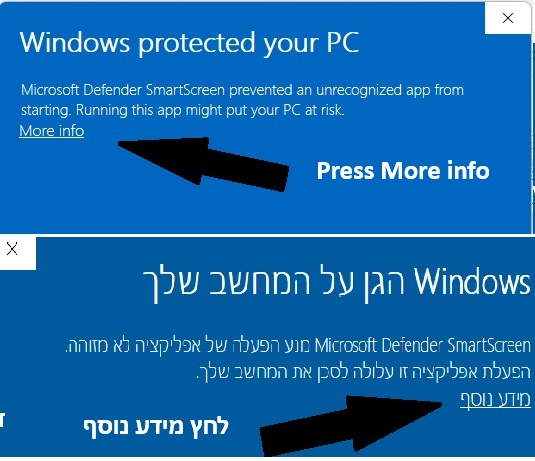
Step 1 — Click "More info"
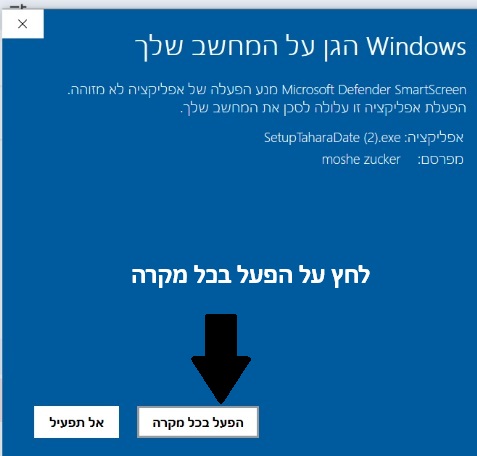
Step 2 — Click "Run anyway"
- 1 After the file has downloaded, run the installation file.
- 2 Windows may display a blue screen saying "Windows protected your PC" — this is normal. Click the "More info" link shown on the screen.
- 3 After clicking "More info", a "Run anyway" button will appear — click it to continue the installation. The software is digitally signed and safe to use.
- 4 When downloading from the Microsoft Store — no warning appears and the installation is completely smooth.
Questions and inquiries:
Email: info@tahara-date.co.il